
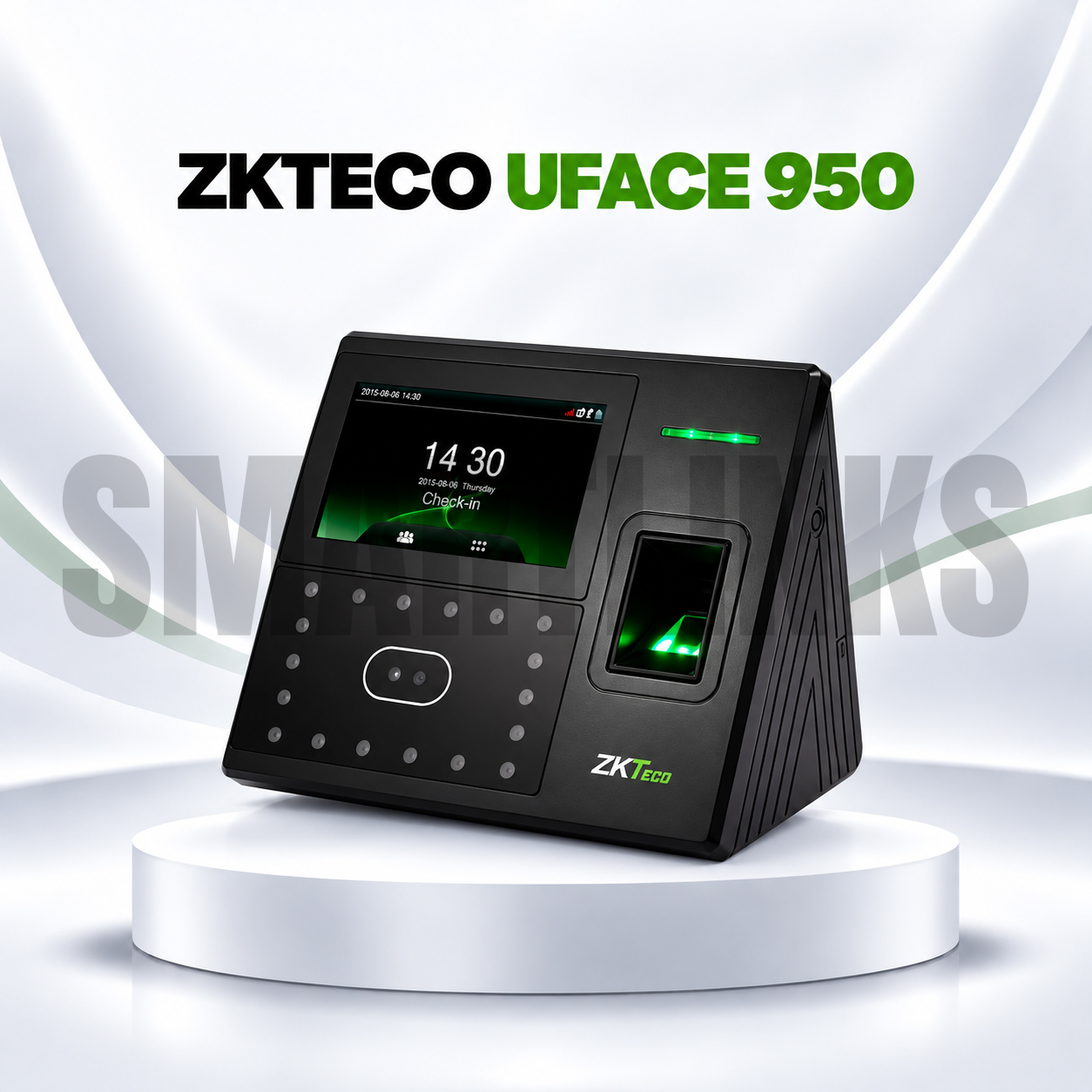
ZKTeco uFace 950 Biometric Attendance Machine – Face & Fingerprint Time Attendance and Access Control Terminal

Key Product Highlights
-
4.3-inch color touchscreen display.
-
Advanced facial recognition and fingerprint authentication.
-
Capacity for up to 3,000 facial templates.
-
Supports up to 4,000 fingerprint templates.
-
Optional RFID card support for up to 10,000 cards.
-
Storage for 100,000 attendance transactions.
-
Facial anti-spoofing features designed to detect certain photo-based attempts.
-
Multilingual, user-friendly interface.
-
TCP/IP Ethernet and USB Host connectivity.
-
Optional WiFi and cellular connectivity on supported configurations.
-
Automatic Attendance Status Switch.
-
Self-Service Query and Work Code support.
-
Scheduled Bell, SMS, and Daylight Saving Time functions.
-
Photo ID, T9 Input, and nine-digit User ID.
-
Optional ADMS functionality.
-
Wiegand output on the Smartlinks-listed configuration.
-
Basic access control for compatible electric locks, door sensors, and exit buttons.
-
Optional 2,000mAh backup battery.
-
DC 12V, 3A power supply.
-
Designed for indoor commercial installations.
Discover More: ZKTeco
Description
ZKTeco uFace 950 Biometric Attendance Machine
The ZKTeco uFace 950 is a multi-biometric time attendance and access control terminal designed for organizations seeking organized employee records and dependable identity verification. It combines facial recognition, fingerprint scanning, and a responsive touchscreen in one device. Offices, schools, retail stores, warehouses, and factories can use the terminal to record working hours, review attendance activity, and support controlled workplace entry with compatible equipment.
Convenient Face and Fingerprint Verification
Employees can register their facial templates and fingerprints for regular attendance check-ins and departures. The uFace 950 supports up to 3,000 face templates and 4,000 fingerprint templates, accommodating different user preferences and enrollment needs. Its facial recognition functions include safeguards intended to distinguish real faces from certain photographs. These protections do not guarantee resistance to every spoofing attempt. Recognition quality depends on lighting, device placement, enrollment accuracy, and routine maintenance. Administrators should test verification at the intended installation location before daily operation.
Clear Touchscreen and Employee Management
A 4.3-inch color touchscreen displays identification feedback, menu options, and administrative controls. Multilingual operation supports teams with different interface preferences. Standard functions include automatic attendance status switching, Work Code, Self-Service Query, SMS, Photo ID, scheduled bells, and daylight saving adjustments. Nine-digit user identifiers and T9 input help administrators organize employee profiles. Clear shift rules and consistent registration procedures can reduce confusion when staff work different schedules or move between departments.
Reliable Networking and Data Transfer
The ZKTeco uFace 950 offers TCP/IP Ethernet communication for connecting to compatible local attendance systems. USB Host provides an alternative method for exporting supported records without maintaining a constant network connection. Optional WiFi and cellular modules are available in certain configurations, but neither should be assumed to be included. Some versions also support ADMS for compatible centralized management arrangements. Confirm the exact firmware, software edition, network requirements, and optional communication hardware before installation. Regular backups and restricted administrator permissions help keep attendance data available and appropriately protected.
Attendance Capacity and Optional Card Access
The terminal stores up to 100,000 transaction records for subsequent attendance reviews. An optional card reader supports as many as 10,000 compatible credentials, depending on the selected hardware. These credential capacities describe stored templates and cards, not a guaranteed count of distinct employees. Organizations should confirm whether RFID components are fitted before advertising card-based verification. Periodic exports, assigned employee identifiers, and clear record retention practices can support consistent reporting and reduce problems during payroll preparation.
Basic Access Control Integration
Alongside attendance tracking, the uFace 950 can connect with compatible third-party electric locks, door sensors, and exit buttons. Its access control features allow an appropriate installation to coordinate biometric verification with door operation. A Wiegand output is also described in the Smartlinks-listed configuration. Professional installers should check lock voltage, wiring, safe emergency exit provisions, and accessory compatibility. The terminal should complement broader workplace security measures rather than replace a complete security system.
Power Requirements and Optional Backup Battery
The manufacturer specifies a 12V DC, 3A power supply, operating temperatures from 0°C to 45°C, and 20% to 80% relative humidity. A 2,000mAh backup battery is optional. When fitted and in suitable condition, it may provide approximately four hours of operation, depending on actual usage. Buyers should confirm the battery and power accessories included with their unit.
Buy ZKTeco uFace 950 in Pakistan
Explore the ZKTeco uFace 950 at Smartlinks.pk for face and fingerprint attendance management. Before ordering, confirm card options, wireless connectivity, software compatibility, included accessories, installation requirements, and warranty terms. Choosing the correct configuration helps businesses maintain organized records and convenient everyday staff verification.
Discover More from ZTKeco
Want to explore more about ZTKeco product? Visit the official ZTKeco website for product insights, support, and the latest smart security solutions.
Official Resource: Explore ZTKeco











































Reviews
Clear filtersThere are no reviews yet.