


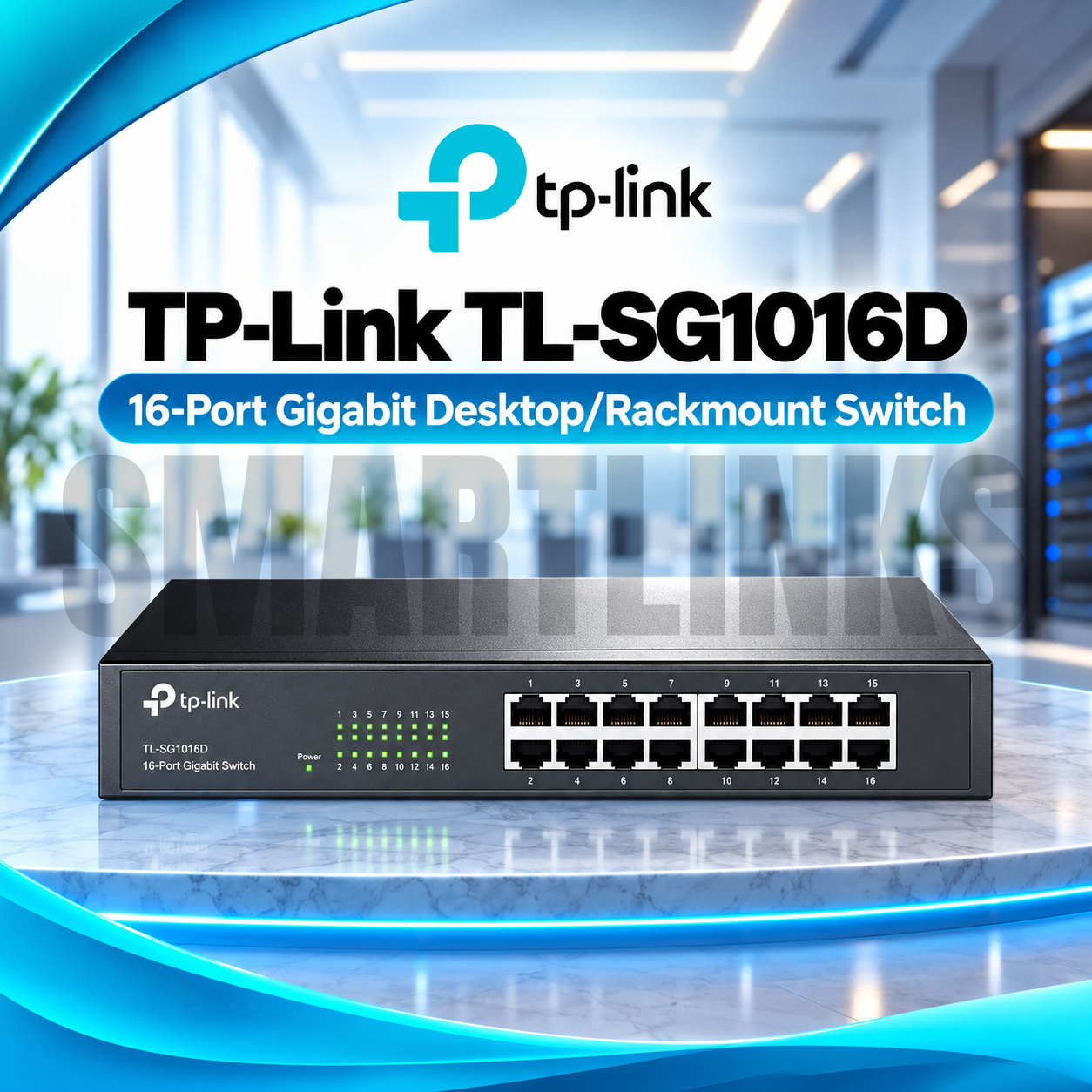


TP-Link TL-SG1016D 16-Port Gigabit Desktop/Rackmount Switch – 1000Mbps Ethernet, 32Gbps Switching Capacity

Key Highlights
-
16 Gigabit RJ45 Ports: Supports 10/100/1000Mbps Ethernet connections.
-
32Gbps Switching Capacity: Handles demanding local network traffic.
-
23.8Mpps Forwarding Rate: Efficient packet processing.
-
Plug-and-Play Installation: No complicated configuration required.
-
Auto MDI/MDIX: Automatically adapts to Ethernet cable connections.
-
Fanless Operation: Quiet performance in offices and workspaces.
-
Energy-Efficient Technology: Helps reduce unnecessary electricity consumption.
-
Flexible Installation: Suitable for desktop or rackmount placement.
-
Durable Metal Housing: Built for dependable everyday networking.
-
8K MAC Address Table: Supports efficient device address learning.
Discover More: TP-Link Network Switches
₨14,000.00
Description

TP-Link TL-SG1016D 16-Port Gigabit Switch
The TP-Link TL-SG1016D is a dependable unmanaged network switch designed to expand wired connections without adding unnecessary complexity. Whether you are upgrading a small office, connecting desktop computers, or organizing equipment in a network cabinet, its sixteen Gigabit Ethernet ports provide a straightforward foundation. The switch connects compatible devices within the same local network and works alongside your existing router, making it useful for growing businesses across Pakistan.
Fast Gigabit Connectivity
Each RJ45 port supports 10Mbps, 100Mbps, and 1000Mbps connections, automatically selecting an appropriate link speed for the attached device. This flexibility helps older hardware and newer Gigabit equipment operate together. With 32Gbps switching capacity and a packet forwarding rate of 23.8 million packets per second, the TL-SG1016D is built for efficient local data movement. Actual transfer speeds also depend on cables, connected equipment, and network conditions.
Simple Plug-and-Play Installation
Setting up the TP-Link TL-SG1016D requires no software installation or advanced networking expertise. Connect its power cable, attach your Ethernet devices, and allow the switch to establish links automatically. Auto MDI/MDIX eliminates the usual concern about straight-through versus crossover Ethernet cables. Automatic MAC address learning helps direct traffic toward the intended destination, while front-panel indicators make it easier to confirm power and connection activity during everyday troubleshooting.
Flexible Desktop and Rackmount Design
A sturdy metal enclosure makes this 16-port Gigabit switch suitable for demanding office environments. Place it on a stable desk or install it in a compatible equipment rack using the supplied mounting accessories. Its fanless construction avoids fan noise, making the device suitable for shared workspaces, reception areas, and compact network installations. For best results, group devices neatly, label cables, avoid tightly bending leads, and keep the switch away from moisture. These installation habits make future maintenance easier and help your network remain organized as equipment grows. Clear labeling also speeds up future device replacements. Ensure adequate ventilation and follow the mounting instructions for dependable operation.
Efficient Traffic Handling
Store-and-forward switching checks incoming Ethernet frames before forwarding them, helping prevent damaged frames from circulating unnecessarily. IEEE 802.3x flow control assists with traffic management when compatible equipment is connected. The switch also provides an 8K MAC address table and jumbo frame support for supported networking scenarios. These capabilities make it a sensible choice for file sharing, office applications, printers, and other routine wired networking tasks.
Energy-Conscious Networking
The TP-Link TL-SG1016D uses energy-saving Ethernet technology that adjusts consumption according to connection conditions. This approach helps avoid unnecessary power use during quieter periods without requiring separate management software. Its quiet, fanless design also removes the need for a constantly running cooling fan. Power requirements and exact energy consumption can differ between hardware versions, so confirm the specifications printed on your particular unit.
Practical Uses and Important Limitations
Use this switch to connect workstations, network printers, servers, wired access points, recording equipment, and other Ethernet devices. Remember that one of the sixteen ports may be needed as an uplink to your router, leaving fifteen for local endpoints. The TL-SG1016D is an unmanaged, non-PoE switch: it does not provide Power over Ethernet to cameras or access points. Devices requiring PoE need appropriate injectors or another compatible power source.
Why Choose the TL-SG1016D?
If you need more Ethernet connections without complicated administration, the TP-Link TL-SG1016D offers a practical balance of capacity, installation flexibility, and familiar networking standards. It suits expanding workplaces, retail counters, computer labs, and structured home networks where consistent wired access matters. Choose suitable Cat5e or better cables for Gigabit connections, check your available rack space, and confirm your required port count before ordering from Smartlinks Pakistan.
Discover More from TP-Link
Want to explore more about TP-Link Network Switches? Visit the official TP-Link website for product insights, support, and the latest smart security solutions.
Official Resource: Explore TP-Link












































Reviews
Clear filtersThere are no reviews yet.